Midjourney AI: The Ultimate Guide to AI Image Generation
Midjourney AI: The Ultimate Guide to AI Image Generation
Introduction
In an era of rapid technological advancement, understanding modern tools and techniques that enhance productivity and improve project management has become essential. One such tool is Midjourney AI, a game-changer in data processing and business management. This platform offers tailored solutions to meet the diverse needs of businesses, thereby amplifying their achievements.
It is a vital tool that uses advanced technologies to enable team collaboration, providing users with capabilities for more effective and efficient project management. Its system supports seamless project management by offering user-friendly interfaces and features that enhance teamwork. Furthermore, it provides flexible documentation and a progress-tracking system, making it easier for teams to adhere to schedules and ensure that no important details are missed.
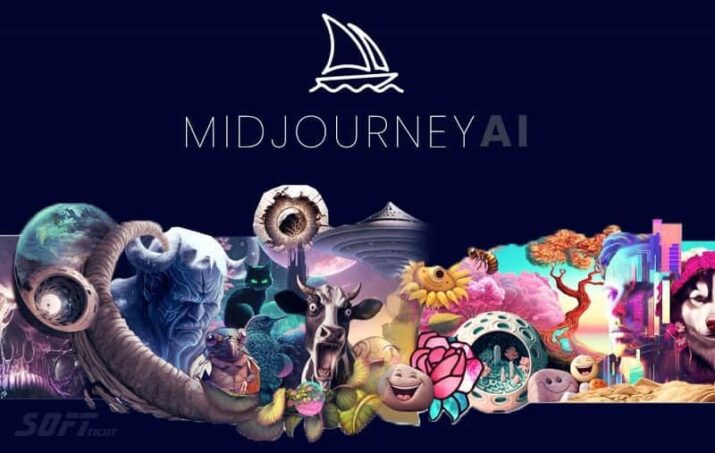
1) What is Midjourney AI?
It’s an AI-powered image creation program/service that uses text prompts. Instead of drawing by hand or using pre-made templates, the user types a description of what they want to see—such as an art style, lighting type, personal details, or atmosphere—and the system then generates multiple images based on the text. It’s particularly popular for creating cinematic-looking artwork, posters, cover designs, and illustrations for creative ideas, as well as rapid prototypes for designers and marketers.
It typically works through a communication platform (such as Discord) or an interface linked to your account, where you send a command and receive image outputs that can be edited and enhanced with subsequent enhancements. The user can also utilize properties such as “Style,” “Aspect Ratio,” “Depth of Detail,” and “Configuration Directions” to increase accuracy.

In short, Midjourney AI combines simplicity (textual description) with high visual output power, making it suitable for both beginners and professionals.
2) Installation and Setup
Midjourney AI typically doesn’t require a traditional installation like office software, as it’s usually accessed through a service account and an interface/channels. The most important step is creating your account and then logging in via the service’s provided platform (often Discord or the web/app interface, if available). Next, you’ll need to configure your login method:
- Set up an account.
- Link your account or join a usage environment (e.g., dedicated server/channel).
- Make sure you have the usage permissions and the command sending interface.
- Review the basic account settings, such as the paid plan/order, usage rights, and quality or speed options.
To get started quickly: use a simple command first (a clear description of the scene) and then experiment with small changes: alter the style (realistic/anime/fantasy), adjust the lighting (daytime/nighttime/fog), or define the composition (top angle/close-up). This way, you’ll quickly learn how the system responds to your text.
3) Key Features
Midjourney AI boasts features that make it powerful in creative generation, most notably:
- Generating images from text: You write a detailed description and receive multiple images. Each image reflects a different interpretation of the text, giving you options quickly.
- Improvement via Iterative Refinement: After the results appear, you can modify the commands, request a version closer to your style, or make specific changes such as changing the background or adjusting the lighting.
- Controlling the composition and quality: Through properties related to style/ratio/scene details (depending on what your account and system versions support), you can control the shape of the output.
- Creative versatility: from designing unconventional visual logos to cinematic shots, to posters and content marketing.
- Ease of use: A command-based interface makes the production process faster than traditional drawing tools.
- Support for artistic styles: Supports generating images in different styles (realistic, fantasy, cartoon, anime, photography, etc.).
Overall, Midjourney AI is not just an “image generator,” but an interactive platform for transforming ideas into optimizable visual models.
4) Security and Privacy
When using any AI-powered search engine, security and privacy must be considered, especially if you’re working with sensitive content, brands, or personal names. At Midjourney, privacy is often linked to how data is stored and how account management is handled. Therefore:
- Use a secure account with a strong password and enable two-factor authentication if available.
- Avoid putting sensitive personal information in orders (phone numbers, addresses, financial data, documents).
- If you are using images as a reference or reference, pay attention to copyright—make sure you have the right to use the content.
- Review the service policies regarding image/input storage, whether it is used to train future models, and how the data is controlled.
- It is best to separate projects: use general commands for non-secret projects, and create different working modes when needed.
In general, follow standard security practices: protect your account, minimize sensitive data, and comply with content copyrights. If you have regulatory requirements, check the privacy policy and usage options within your account.
5) Integration with other tools
Midjourney AI integration is typically a workaround via a “produce → export → edit” path within the design tools. Even if there isn’t deep, direct integration with every tool, you can easily integrate its outputs:
- Design/Edit: You can input the resulting images into tools such as photo editing software (for montage, cropping, color enhancement, and adding text elements).
- Marketing presentations and content: Use the outputs as backgrounds or initial designs for marketing pages, then modify them visually.
- Video/Media: Convert images into storyboards or titles, then develop them within editing tools.
- Designer workflow: Some teams use Midjourney to quickly generate creative directions, then go to Figma/Photoshop/Illustrator (or equivalent) to prepare final versions.
- Project management: Results can be organized into folders and references by client/task, and then referred back to when a modification is requested.
To maximize efficiency, create a consistent Prompts template for your project portfolio and assign it keys that match your brand colors and desired style. This makes integration into your workflow much smoother.
6) Customer support and help center
It’s important to know the quality of technical support, because any AI-powered productivity service needs help when problems arise, such as results not appearing, login issues, permission changes, or questions about plans. Typically, it offers support channels like a Help Center or documentation explaining settings and general usage. The service may also have community channels or forums where users ask questions and benefit from answers from the support team or expert users.
When seeking support, focus on:
- Quick Start page and official instructions for usage commands.
- Troubleshooting guidelines (e.g., debit/billing/limit errors).
- Plan and subscription management information (upgrade/cancel/renew).
- Questions related to output quality or usage restrictions.
For faster assistance, prepare a description of the problem and the steps to reproduce it, mention the account type and plan approximately, and the time the problem occurred. All of this helps support diagnosing the issue quickly.
7) Prices and plans
Midjourney AI pricing varies depending on the plan (free/trial plans, if available, and paid plans at different tiers) and usage limits such as the number of generation operations, processing speed, and output quality. Generally, paid plans offer the user:
- A larger number of orders per month or within a subscription cycle.
- Higher quality options or additional customizations (depending on what is available at your time).
- Faster processing or priority-related advantages.
To determine which plan is right for you, ask yourself:
- Are you an individual user or do you work as part of a team?
- How many photos do you need per week?
- Are you working on large projects that require high quality and frequent repetition?
- Do you need advanced control options, or are standard results enough for you?
It’s best to check the pricing page directly within your account, as details may change. If you’re only using it for testing, start with a lower plan and move up once you’re confident in your workload. If you’re a designer/marketer, a higher plan might be more economical with frequent production.
8) Advantages and disadvantages
Pros:
- High speed in generating visual ideas: You can convert text into images in a short time, which accelerates creativity and modeling.
- High technical quality: Many of the outputs look professional from the first attempt, especially with good prompts.
- Multiple styles: You can experiment with many styles (realistic/fantasy/anime/cinematic) without learning complex drawing tools.
- Interactive optimization: Each copy gives you an indicator of what needs to be modified in the text to get a more accurate result.
- Useful for professionals and beginners: the beginner only needs clear descriptions, while the professional benefits from precise guidance.
Cons:
- Cost: Extensive reliance may increase costs depending on the plan and limits.
- Fluctuations in results: Sometimes it takes several attempts to get the idea closer to reality.
- Limitations on customization: A perfect match to what you envision cannot always be guaranteed without redirection.
- Rights and ownership considerations: Attention should be paid to protected content and trademark rights when using the outputs.
- Learning to write commands: Although it’s easy to get started, writing effective prompts requires practice.
9) User experiences and testimonials
Users often praise Midjourney for two reasons: the beauty of the results and the ease of use. Many designers say that Midjourney AI helps them overcome the initial “blindness” phase of a project; instead of sitting for long periods in front of a blank design, the platform quickly generates multiple options and gives them a visual direction to build upon.
Users also mention that iteration is fun and practical: if you don’t like the result, you modify the words and try again, gradually working towards the desired result.
Conversely, some users complain that the results may differ significantly from what they intended, especially when requesting very precise details (such as accurate facial proportions or text within the image). Others may also find that the limitations of the paid plan restrict the number of attempts, making repeated production costly.
The takeaway from “user testimonials” in general: Midjourney is strong in inspiration and visual directions, but it is not a “guaranteed final generation” tool every time—it usually needs iteration and good guidance.
10) Use cases / Case studies
Midjourney can be used in many scenarios, most notably:
- Poster and poster design: A marketing team writes a description of a new campaign (color type, message style, cinematic style) and generates several versions to choose the best one.
- Cover/visual identity templates: A publisher or designer feeds cover ideas—such as a fantasy world or a scientific atmosphere—then chooses a visual direction and modifies it in a design tool later.
- Social media content design: Create multiple images with consistent styles for a weekly campaign. Standard prompts for color and lighting can be set up to ensure a unified identity.
- Game/Story Concepts: Independent game developers use it to plan early characters and scenes (Concept Art).
- Presentations and brainstorming: Instead of relying on an initial hand-drawn sketch, the team quickly generates images that reflect the idea.
Typical case study (generally speaking): A small business needs 10 directional designs within two days. Using Midjourney, it creates three different prompts, then decides on the best direction and implements the final version internally. This reduces time and effort and increases the number of options available for approval.
11) Comparison with other tools
When comparing Midjourney AI to other image generation tools, differences such as: the quality of the artistic style, ease of control, and the nature of the interface and limitations of use are usually mentioned.
- In terms of “beauty of output”: Midjourney is often recognized for its strong artistic touch and cinematic direction—very suitable for those looking for “visually ready” results quickly.
- In terms of control: Some tools may offer more precise control over certain aspects (such as specific elements or finer reconstruction), while Midjourney focuses more on text routing and iteration.
- In terms of workflow: Many find Midjourney easy to get started with and provide quick directions, while other tools may be closer to generating/modifying directions with a longer time or a different interface.
- In terms of cost and usage limits: Each tool has different plans and limitations, and may be best for a specific person depending on their production volume.
- In terms of integration: Some solutions offer more direct integration with specific platforms or workflows.
The best way to choose: Try similar models of the same idea on more than one tool (with similar prompts), then compare: the quality of the result, the number of attempts required, and the suitability of the output for your field of work.
12) Tips for effective use
To get results closer to what you want, use these tips:
- Start with a clear description: Who/What is the subject? Where is the place? What is the general atmosphere?
- Specify the style: realistic, photographic, anime, “cinematic”, “oil painting”, etc.
- Specify the lighting: such as soft light, sunset, studio lighting, fog, night shots…
- Control the composition: Say: Close-up/Wide shot/Top angle/Personality focus.
- Use detailed words instead of long sentences: Often, “descriptive vocabulary” gives better results than a long, disorganized description.
- Gradual experimentation: Don’t change 10 things at once. Change one element at a time to see its effect.
- Maintain identity consistency: If you’re working for a brand, keep the color palette and atmosphere consistent within prompts.
- Save successful prompts: Create a prompts library for recurring projects.
In this way, Midjourney AI transforms from a “random experiment” into a directed planning and production tool.
13) Frequently Asked Questions
- Do I need technical expertise? Probably not. You can start with a simple text description and then gradually develop prompts.
- Are images supported as references? There may be features for uploading/using references depending on your account and service version. Check your interface options.
- Can I achieve 100% accuracy? Not always. Sometimes you need several attempts or redirects to get a close match.
- Can the output be used commercially? The answer depends on the service policies and rights laws in your country. See Midjourney ‘s Terms of Use.
- Why do some results look different from the description “exactly”? Because artificial intelligence interprets words and generates a visual pattern; words may have multiple interpretations.
- How do I improve the quality of the result? Write a more detailed description, specify the lighting, composition, and style, and repeat with small changes.
- What is the best way to learn? Choose one idea and try 20 versions of prompts with incremental modifications, then evaluate which version is closest to your goal.
14) The importance of system maintenance
Even though Midjourney AI is a “cloud service,” the concept of “system maintenance” is evident in aspects related to your account and workflow. Key maintenance points include:
- Review your account and plan: Make sure the subscription is active and that usage limits won’t hinder your project at a critical time.
- Organize commands and results: Keep organized folders (by client/project/method) and copies of successful prompts. This reduces wasted time and makes recovery easier.
- Workflow update: As service interfaces change or new features are added, monitor what actually supports your account.
- Account access security: Use strong passwords and enable security (if available) to avoid a breach that could disrupt your productivity.
- Rights verification: Review usage policies before releasing extensive commercial content, especially if you use words relating to protected characters/tags/methods.
- Backing up output: Keep files in a safe place within your device or team system instead of relying solely on the interface.
Maintenance here is not so much a technical software update as it is a “production management” that reduces errors and increases stability.
15) Additional Lessons and Resources
To improve your results, you need educational resources to help you write better prompts. The best resources are often:
- Official documentation and help center: because they explain the actual usage and features available.
- Examples of prompts posted in the community: help you understand the most impactful word “template”.
- YouTube tutorials/courses: Useful for practical learning; look for content that focuses on: style, lighting, composition, and correcting results.
- Discord groups and communities/forums: These allow you to see what works for other users and ask direct questions.
- Design references, such as rules of visual composition, color theories, and cinematic principles of lighting, provide a “logic” to the prompts instead of randomness.
Practical tip: Choose only 3 learning resources to start with to avoid overwhelming yourself, then apply what you learn to a small project each week. Record your 10 best prompts and repeat them with slight variations.
16) System requirements
Because Midjourney often operates as a cloud service, its system requirements are typically simpler compared to on-premises software. Basic requirements:
- An internet-connected device (laptop/desktop computer or phone/tablet).
- A modern browser (to access the interface if it is a web browser) or an application/access platform interface if it is via a communication channel.
- A stable internet connection is required to avoid interruptions while sending commands or downloading results.
- Storage space to save outputs when downloading or copying them to your projects, especially if the quality is high.
- A Midjourney account is active with a plan that gives you the required usage limits.
Unlike local programs, the quality of the rendering doesn’t depend on your graphics card specifications; rendering takes place on the service’s servers. Therefore, even mid-range devices will perform well as long as the connection is good. If you experience slowness, try changing your internet network or using a more stable connection, and close any unnecessary resource-intensive applications.
17) Quick Start
To get started with Midjourney quickly and with good results, follow these simple steps:
- Create your account on the service and log in.
- Start with a short, clear description: Example (as a principle): “Portrait of a young woman, cinematic lighting, soft shadows, 85mm lens look, shallow depth of field, ultra-detailed.”
- Specify the style: If you want anime, add “anime style”. If you want realism, add “photorealistic”.
- Make the composition clear: “close-up”, “wide shot”, “centered composition”, “rule of thirds” (whichever you prefer).
- Run the first attempt and then gradually improve: don’t change everything; change only one element in each attempt (lighting, background, or shooting angle).
- Saving successful prompts: Create a file or note with the prompt elements that gave the best result.
After 10–15 attempts, you’ll notice significant improvement. The most important point: don’t aim for perfection the first time; your goal is to build a “command language” that suits your vision.
18) Common problems and troubleshooting
The most common problems you might encounter are related to: connection, calculation, or inconsistent results quality. Practical solutions:
- Results do not appear or appear late: Check your connection, make sure you have not exceeded the plan limits, and try again after a short time.
- Error messages related to subscription/balances: Check the plan page within the account, and make sure that the renewal/payment was successful.
- Results that don’t match the description: The problem is often in the wording of the prompt. Try adding details such as lighting, composition, and style instead of relying on general terms.
- To replicate very similar results: change an influential element such as the type of scene, lens, camera angle, or overall atmosphere.
- Discord account/interface problems: Log out and then log back in, check the permissions, and relink the channel if available.
- Peak hour work: Response time may increase; try sending the request during a less busy time.
General rule: Note the prompt that caused the problem, and change one part at a time. This makes diagnosis faster than changing everything at once.
19) Best practices for optimal performance
To achieve optimal performance and less waste, follow these best practices:
- Write a “testable” Prompt: Make it consist of parts: Theme + Style + Lighting + Composition + Quality/Details.
- Proceed step by step: Start with a general version, then a more specific version, and then a version based on the closest result.
- Use a consistent vocabulary for your team: for example, a set of lighting words and a set for techniques, to ensure consistency among team members.
- Define your objective before sending: Do you want directional ideas or a final image? This determines the level of quality and time.
- Reduce random changes: Changing several elements at once makes it difficult to know what messed up the result.
- Rights review: If the projects are commercial, avoid introducing potentially protected elements or trademark/character names in an unauthorized manner.
- Organizing files: This will enable you to compare results quickly and make a faster decision.
Ultimately, optimal performance means: fewer attempts, higher quality, and faster decision-making—and this is often achieved through a prompts methodology rather than luck.
20) Future updates and roadmap
It’s impossible to definitively predict Midjourney’s future roadmap without consulting official sources, as features may change with service updates. However, you can generally expect two patterns of development:
- Improving accuracy and detail quality: Updates will often aim to reduce variance and increase consistency between the prompt and the output.
- Increased controls: such as providing more precise configuration options, improved handling of special styles, or better support for customizing visual identity.
- Expanding integration: The possibilities for linking with designers’ workflows or content publishing platforms may expand.
- Improving efficiency and reducing response time: Services usually strive to improve performance, especially with increased demand.
To stay informed: Monitor any announcements/blog pages, official community channels, or update documentation within your account. When new features are released, test them on a small project first to assess their usefulness before full adoption.
21) Community and user forums
The Midjourney community is often an integral part of the user experience, as sharing helps you learn to write prompts quickly. You’ll typically find users sharing ready-made examples and explaining how they built their prompts to achieve specific results: from “cinematic portrait” to “architectural visualization.” Design teams also ask questions about the best ways to maintain color consistency or convert outputs into final designs within other tools.
I recommend joining specialized channels/forums and following user posts that include: the full prompt + the result + what was modified. Most importantly: don’t rely solely on “verbatim copying”; try to understand the logic behind the words and then apply them to your own idea.
Conclusion: Midjourney AI: The Ultimate Guide to AI Image Generation
Ultimately, Midjourney AI is a powerful tool for quickly transforming ideas into visuals using a variety of artistic techniques, making it suitable for designers, marketers, content creators, and even beginners who want to learn to create using text commands. The platform’s strength lies not only in the quality of its output but also in its reproducibility and optimization: each attempt provides data on how the system responds to your description, and over time, you can build more precise prompts that deliver results closer to your original vision.
But like any tool, it has limitations: sometimes multiple attempts are needed to achieve a close match, and cost and usage limitations can affect production pace. Therefore, plan carefully: use clear commands, organize your results, and review privacy and rights policies for commercial projects.
If you apply best practices and engage with the community, you will quickly notice that Midjourney transforms from a fleeting experience into an active part of your creative workflow.