Process Hacker Free Download 2026: The Best Monitor System
Process Hacker Free Download 2026: The Best Monitor System
Process Hacker: Advanced Tool for Windows Process Management
Monitoring and managing processes on Windows is essential for maintaining performance and stability. With the complexity of modern computing environments, it is crucial to use powerful and reliable tools that allow resource monitoring and process control. Process Hacker is considered one of the most prominent open-source tools that meet these needs. This tool provides an advanced interface for process monitoring, resource analysis, and interacting with processes in detail.
It is also suitable for developers and security experts who need detailed system information. Using such tools helps improve overall performance, detect problems early, and protect the system from malicious software.
What is Process Hacker?
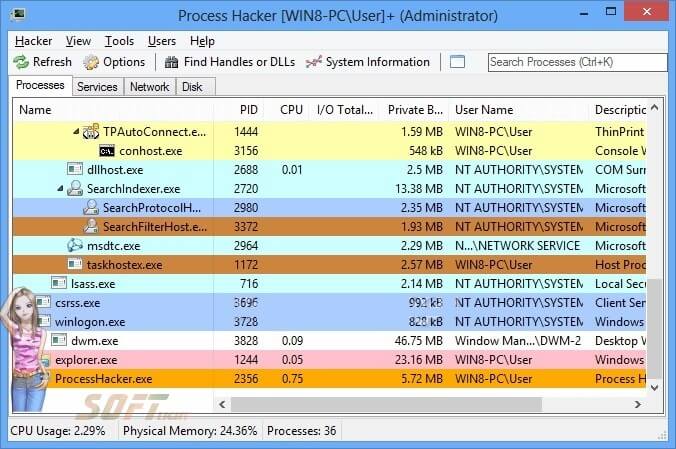
Process Hacker is an open-source program specifically designed to monitor and manage processes on Windows. The program displays all running processes with detailed information about CPU usage, memory, network, and overall system performance. It features a flexible graphical interface that allows users to view processes in an organized and understandable way.
It also provides advanced analysis tools that help detect any abnormal activity or malicious programs running in the background. Thanks to these capabilities, the program has become an essential tool for professionals seeking precise system data and improved performance.
Installation and Setup
Installation Steps
The first step is to download the official version of Process Hacker from the official website or from trusted platforms like SourceForge. After downloading, you can choose the appropriate version, whether it is an installed version or a portable version that does not require installation. When running the setup file, follow the on-screen instructions to install the program successfully.
Initial Configuration
After installation, it is important to configure the tool to suit the user’s needs. You can customize the interface, arrange columns to display the most important information, and set alerts for critical process notifications. Plugins can also be configured to extend the program’s functionality. This initial setup makes the tool easier to use efficiently and ensures optimal performance while monitoring the system.
Main Features
1. Process Monitoring
The program provides a detailed view of all running processes on the system, including the process name, process ID (PID), CPU and memory usage, and network connection status. This information helps users identify and monitor the most resource-intensive processes.
2. Process Management
Process Hacker allows users full control over processes, including terminating processes, adjusting priorities, and changing permissions. This feature is useful for resolving issues related to stuck processes or processes that affect system stability.
3. Network Monitoring
The tool provides details about the network connections for each process, allowing monitoring of network activity and checking for suspicious connections. This feature is important for detecting unwanted activities or malicious software that may affect system security.
4. Memory Analysis
This feature enables users to examine the memory content associated with processes, which is crucial for performance analysis and detecting abnormal activity. It helps identify security vulnerabilities or malicious software running in the background.
5. Plugin Support
The program supports plugins that allow users to extend its functionality, whether by adding new features, analyzing DLL files, or generating more detailed process reports.
Customer Support and Help Center
Being an open-source program, Process Hacker relies heavily on community support. Users can visit forums like SourceForge and Reddit to ask questions, share experiences, and discuss technical issues. The community also provides video tutorials and written guides to facilitate tool usage. Community support offers quick and effective solutions to problems and encourages sharing tips for optimal use and improved system performance.
Pricing and Plans
One of the main advantages of Process Hacker is that it is completely free and open-source. There are no fees or subscriptions, and anyone can download and use it freely. This makes the tool accessible to everyone, from casual users to professionals. Support and updates come from the volunteer community dedicated to improving performance and adding new features.

Pros and Cons
Pros
- Free and open-source: anyone can use it at no cost.
- Advanced graphical interface: makes process tracking and performance analysis precise and easy.
- Extensive customization capabilities: allow modification of columns, process alerts, and plugins to suit each user.
- Plugin support: enables expanding the program’s functionality easily as needed.
- Suitable for developers and security analysts: provides advanced tools for system monitoring and process analysis.
Cons
- It can be complex for beginners: it requires a good understanding of the system to benefit fully.
- May trigger security software warnings: due to advanced functions, it may be considered potentially suspicious.
- Updates may be irregular: being open-source, updates may not be frequent.
User Experiences and Testimonials
Many users have praised the tool’s powerful analytical capabilities, noting that it is ideal for identifying processes that consume system resources abnormally. Some comments highlighted the comfortable graphical interface and easy access to detailed information. Users also noted the strength of network and memory monitoring tools, which help detect and analyze malicious software effectively.
Comparison with Other Tools
| Tool | Main Features | Price |
|---|---|---|
| Process Hacker | Advanced interface, plugin support, detailed analysis | Free |
| Task Manager | Built-in with Windows, easy to use | Free |
| Process Explorer | Graphical interface, advanced process analysis | Free |
Tips for Effective Use
- Use filters to quickly and efficiently identify important processes.
- Customize columns to clearly display the most important data.
- Use plugins to extend functionality and improve analysis.
- Monitor suspicious processes to detect malicious software early.
- Regularly update the tool to ensure the latest features and improvements.
Frequently Asked Questions
Is Process Hacker safe?
Yes, the tool is safe to use, but due to its advanced functions, some security programs may flag it as a potential threat.
Does it require installation?
No, there is a portable version that can run directly without installation.
Does it work on other operating systems?
The program is designed only for Windows and does not support Linux or macOS.
Importance of System Maintenance
Using tools like Process Hacker helps maintain the system effectively. By monitoring processes and resources, any issues or bottlenecks can be detected before affecting overall performance. The tool also assists in managing critical processes and protecting the system from malicious software, ensuring long-term system stability.
Additional Lessons and Resources
- Official user guide on SourceForge
- Community forums on SourceForge Forums
- YouTube tutorials demonstrating advanced usage and analysis
System Requirements
- Operating System: Windows 7 or later (32-bit or 64-bit)
- Processor: Any Windows-compatible processor
- Memory: At least 1 GB RAM
- Storage: 50 MB free space
Getting Started
To get started with Process Hacker, download the appropriate version, either installed or portable, and follow the setup steps or run the portable version directly. Then configure the interface and add plugins to facilitate process monitoring and analysis.
Common Issues and Troubleshooting
- Security warnings: add the tool to the whitelist.
- Some processes are not appearing: run the program as an administrator.
- Program stops responding: ensure it is updated to the latest version.
Best Practices for Optimal Performance
- Monitor resource usage regularly.
- Customize columns and interface to display critical information.
- Use plugins to enhance tool functionality.
- Avoid modifying essential system processes randomly.
- Set alerts to monitor critical and suspicious processes.
- Keep the tool updated for stable performance and system security.
Future Updates and Roadmap
Development teams and the community continue to improve Process Hacker, with plans to enhance memory and network support, add advanced analysis tools, and expand plugin capabilities. Future updates will increase responsiveness, user interface flexibility, and system protection.
Community and User Forums
The community provides extensive support through forums, tutorials, and shared solutions. It enables sharing tips, solving technical problems, and providing practical examples for efficient tool usage, making it more powerful and reliable.
Conclusion
Process Hacker is a free and advanced tool for managing and monitoring Windows processes. It offers advanced features such as process monitoring, network management, memory analysis, and plugin support, with extensive customization options. Despite some complexity for beginners and potential security warnings, its advantages make it indispensable for developers and security experts. By following best practices and leveraging community support, users can enhance performance, improve security, and maintain system stability.
Technical Details
- Category: System Management
Software name: Process Hacker
- License: Open Source
- File size: 5.6 MB
- Operating Systems: Windows XP / Vista SP1 / 7 / 8 / 10 / 11, 32/64-bit
- Languages: Multilingual
- Developer: Wen Jia Liu (wj32)
- Official website: processhacker.sourceforge.io