XMedia Recode Free Download 2026 Video/Audio Converter
XMedia Recode Free Download 2026 Video/Audio Converter
XMedia Recode is a free video and audio converter. It supports almost all audio and video codecs. A universal media converter, which combines the most common audio and video formats. It supports conversion in different formats. You can find the complete information below.
XMedia Recode
It is a free video and audio converter for Microsoft Windows developed by Sebastian Dörfler. It can import and export many file types, like WMV, MP4, MP3, 3GP, Matroska, and more. Can convert unprotected DVDs or DVDs to any supported output file. It features a drag-and-drop interface and uses the task queue and batch processing to automate the task of converting multiple files to code. The program is being actively updated. Recent additions include importing external subtitles, improved stability, the latest x264 / FFmpeg, video rotation, etc.

XMedia Recode Features
- Crop parts of the video.
- Choose frame color freely.
- Cut the video.
- Drag and drop video files directly onto the encoder.
- Selection width format (1: 1, 3: 2, 4: 3, 5: 4, 5: 6, 11: 9,16: 9, 16:10, 2.21: 1).
- Produce DVD copies for iPod and iPhone.
- Capture Zoom (None, type Character box, media, pan scan, to screen).
- Direct streaming copy function.
- Size correction.
- Production of DVD copies for mobile phones
- You can change the frame rate and bit rate.
- The audio stream can be extracted from most video formats.
- Produce DVD copies of the computer.
Note: DirectX 9 and Nvidia GPU driver require 347.09 or higher. Besides conversion, XMedia Recode also has basic editing capabilities.
Output to ‘Video and Audio’, ‘Video Only’, or ‘Audio Only’.
- Copy videos and/or audio from the input file (to avoid conversion)
- Presets (called profiles) for different media devices (such as PS3, Xbox 360, iPhone, PSP, Zune, and more).
- There are many languages (German, English, French, Italian, Japanese, Portuguese, Polish, and Russian).
- It includes a Bitrate-Calculator that can calculate the video bitrate required to achieve a desirable file size based on different media (CD, DVD, memory cards, etc.).
- It allows users to select a percentage of the media for precise control.
- It supports multiple audio tracks.
- Displays basic media information about each video using Media Info.
- A more detailed view can be accessed from the right-click context menu for each video.
- It supports batch processing when multiple videos are selected in the main interface (Ctrl + click or Shift + click).
- Multiple featured functions will have the same conversion settings, and multiple functions will be added simultaneously.
- Supports adding external audio tracks and subtitle files.
Calculate Bitrate
Xmedia Recode includes a bitrate calculator capable of resizing videos to fit different media, including CD-R, DVD-5 (4.7 GB), DVD-9 (8.5 GB), and memory cards ranging from 128 MB to 32 GB. Videos can be calculated on a percentage of selected media or a specific file size. Unlike most bit rate calculators, it calculates video and audio streams together.
The bitrate calculator can configure output settings such as accuracy, bitrate mode (eg, ABR, 2-pass, etc.), and settings similar to the audio track (s). This functionality is missing in version 3.2.5.2, but it is still possible to set the bit rate manually.
Input formats supported
MP2, MP3, MP4, MP4V, MP3, MPEG-1, MPEG-2, MPEG-4, MPEG-4, QuickTime, Ogg, OGM, OPUS, and PVA, REC, RealMedia, RMVB, SVCD, SWF, THP, TS, TRP, TP0, VCD, VOB, WebM, WMA, WMV. and WPL, 3GP, 3G2, AAC, AC3, AIFF, AMR, APE, ASF, AVI, AviSynth, AU, DVD, DTS, E-AC3, FLAC, FLV, H.261, H.263, H.264, M2TS, M1V, M2V, M3U, M3U8, M4A, M4P, M4V, Matroska, MMF.
Supported output formats
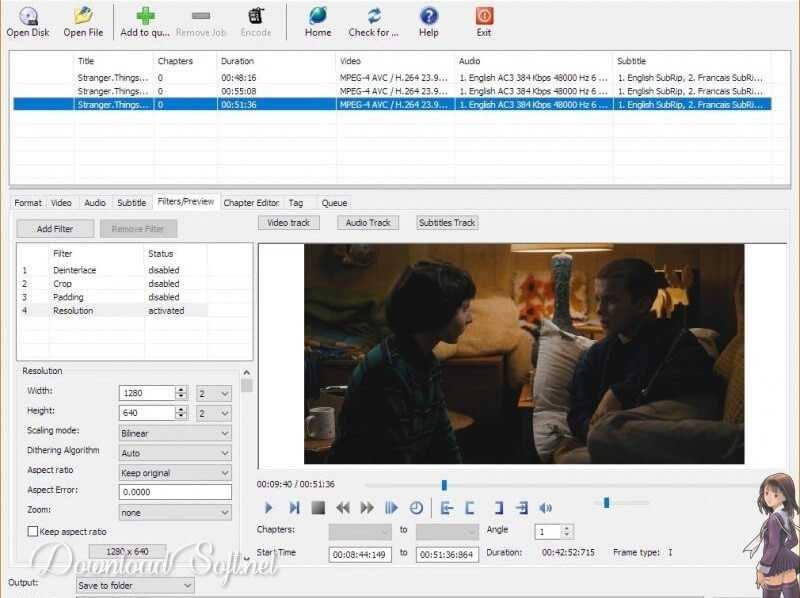
XMedia Recode 3.4.3.6 conversion window running on Windows 10.
Video formats
Flash Video, Flash Screen Video, H.261, H.263, H.263 + H.264 / MPEG-4 AVC (Huffyuv, M-JPEG, MPEG-1, MPEG-2, Theora, VP8, WMV V7, WMV V8 NVENC are not supported anymore, Asus V1, Asus V2, MPEG-4 Part 2, MS MPEG4 V2, MS MPEG4 V3 DV Video.
Audio formats
MP2, MP3, OPUS, Vorbis, WAV-PCM 16 endian, WAV-PCM 16 endian, WAV-PCM 24 WAV-PCM U8, WMA V7, WMA V8, AAC, AC3, ADPCM MICROSOFT, ADPCM YAMAHA, A-LAW, AMR NB, AMR WB.
Translation formats
.ass, .jss, .js, .ssa, .srt
Supported output device profiles
Palm, Panasonic, TV, Philips, PocketPC, SanDisk, Samsung, Samsung TV, Seagate, Sharp, Sony, Sony Ericsson, Sony PlayStation 3, Sony PSP, Sony TV, T-Mobile, Telefunken, Toshiba, Trek store, Vodafone, Western Digital, YouTube, Acer. Apple, Asus, Archos, Blackberry, Kwon, Creative Labs, Dell, DVD Player (Standalone), Elson, Epson, Garmin, Google, Haobagi, Huawei, HTC, Humax, Hyundai, Intenso, iRiver, LG, Loewe, Microsoft, Motorola, Nikon, Nintendo, Nokia, Odis, O2.
System Requirements
- Processor: Intel / AMD compatible at 1 GHz or higher
- RAM: 1 GB
- DirectX: DirectX 9
- Nvidia CUDA: Nvidia GPU driver 347.09 or higher
Windows 7, 8, 8.1, 10, and 11 for current versions
Windows XP and Vista up to version 3.2.7.1
Restrictions
- The Bitrate Calculator does not allow you to select the number of channels for audio tracks (the default settings for Stereo.
- System-wide brightness, contrast, and color adjustments (from Nvidia or ATI Control Panel) will be detected during the preview and will be encrypted in the output file.
- Lack of documentation for encoding options (hover tooltips).
- By default, all videos are framed to ‘keep original’, but this can sometimes create corrupted or damaged videos.
- Therefore, the user has to choose the desired frame each time to prevent the problem mentioned.
- Many profile settings (e.g. file extensions, video codecs, audio codecs) are closed and are therefore at the discretion of the XMedia Recode developer.
- Permanently modifying or modifying existing profiles from the GUI is not allowed. Instead, they must be modified via a text editor.
- Maximum frame support is 180, and custom frames are not supported.
- Lack of video rotation support.
- Sometimes, cropping and resizing options are problematic and do not work as intended.
- A 64-bit version is available.
- Audio Normalization – The program crashes when you choose the audio output codec as AAC
Recommendations
- Explore the User Interface
Familiarize yourself with the intuitive interface of XMedia Recode. Understanding where all the tools and options are located will significantly enhance your productivity. - Use Presets for Quick Conversions
Take advantage of the preset options available for various devices and formats. This can save you time and ensure optimal settings for your specific needs. - Adjust Output Settings
Customize the output settings according to your preferences. You can modify bitrate, resolution, and codec to achieve the desired quality for your media. - Batch Processing
Use the batch processing feature to convert multiple files at once. This is particularly useful for managing large collections of videos or audio files efficiently. - Trim and Edit Videos
Utilize the editing features to trim or cut sections of your videos. This allows you to create the perfect clip without needing additional software. - Preview Before Conversion
Always preview your settings before starting the conversion process. This ensures that you’re happy with the adjustments and helps avoid unnecessary conversions. - Check Format Compatibility
Ensure that the output format is compatible with your intended device. It supports a wide range of formats, so double-checking can save you headaches later. - Use Metadata Options
Take advantage of the metadata options to add information like title, artist, or genre. This can help keep your media library organized and easy to navigate. - Regular Updates
Keep XMedia Recode updated to benefit from the latest features and improvements. Regular updates can also enhance compatibility with newer file formats. - Utilize the Help Resources
Don’t hesitate to use the help resources available within the software. The documentation and community forums can provide valuable insights and troubleshooting tips.
Conclusion
In conclusion, XMedia Recode is a powerful and versatile tool for managing your media files. By following these recommendations, you can maximize its potential and streamline your workflow. Whether you are converting videos for personal use or preparing audio files for professional projects, understanding the features and options available will lead to a more efficient and enjoyable experience.
Investing time in learning how to effectively use it will ultimately save you effort and enhance the quality of your media projects. With its user-friendly interface and extensive capabilities, this software is an excellent choice for anyone looking to manage their media library with ease.
Technical Details
- Category: Multimedia Software
Software name: XMedia Recode
- Version: The latest
- License: Freeware
- File Size: 14.5 MB
- Operating Systems: All versions of Windows
- Core: 32/64-bit
- Languages: Multilingual
- Developer: Sebastian Dorfler
- Official site: xmedia-recode