G Data Total Security Free Download & Complete Review 2026
G Data Total Security Free Download & Complete Review 2026
G Data Total Security Introduction
Have you ever heard of a security program that runs two separate antivirus engines simultaneously? That is exactly what this German security suite offers. It stands as one of the oldest and most respected names in the cybersecurity industry.
The company behind this tool was founded back in 1985 in Bochum, Germany. It is widely recognised as one of the very first businesses to develop antivirus software worldwide. Many government institutions and large corporations across Europe trust this product, especially in Germany, Austria, and Switzerland.
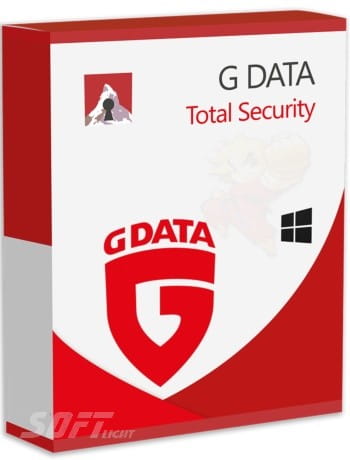
This particular edition represents the most complete version within the entire product family. It provides full protection for your computer against all kinds of threats: traditional viruses, ransomware, spyware, phishing attacks, and even advanced fileless malware.
What makes this application truly unique is its patented DoubleScan technology. This feature uses two independent antivirus engines working together to catch even the most complex and hidden threats. On top of that, it includes a full set of extra tools such as a VPN, password manager, webcam protection, parental controls, and system optimisation utilities.
Who is G Data Total Security for?
- Users who want maximum protection and do not mind slightly higher resource usage.
- Small business owners and individuals handling sensitive data.
- Advanced users who want fine control over every security setting.
- Those who prefer German-engineered products for their precision and reliability.
1. G Data Total Security Interface and Ease of Use
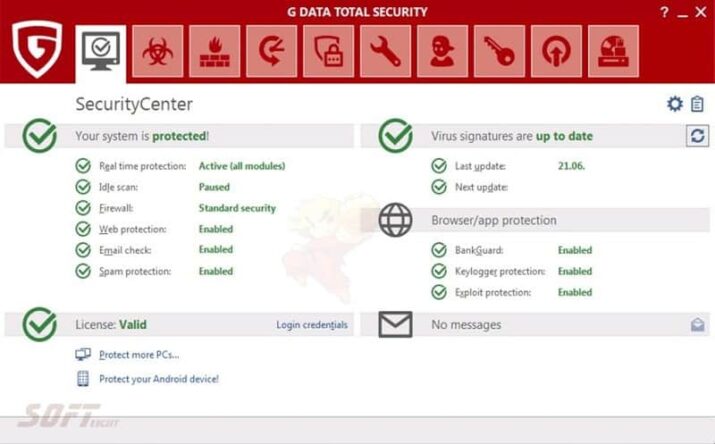
Once you install this software, you will immediately notice its German-style interface: practical, well-organised, and free from unnecessary decorations. Do not expect fancy animations or bright, flashy colours. Instead, you get a clean design based on white, black, and blue accents, with clear tabs that give you quick access to all settings.
Main tabs inside the interface:
- Status: A central dashboard showing your protection level at a single glance. You can see if the software is up to date, if real-time protection is active, and when the last scan happened.
- Virus Protection: Here you can run scans, schedule automatic scans, and access advanced scanning settings.
- Firewall: Controls incoming and outgoing network connections, with the ability to create custom rules for each application.
- Web & Mail: Settings for browsing protection, malicious link blocking, and email scanning.
- Data Safety: Tools for ransomware protection, backup, and file encryption.
- PC Tune-Up: Utilities to clean the registry, delete temporary files, and manage startup programs.
- Settings: Where advanced users can adjust every tiny detail of the protection.
Ease of use for beginners:
G Data Total Security comes with excellent default settings that suit 90% of users. Once installed, it runs quietly in the background without bothering you. The default mode is “smart protection,” which makes decisions on your behalf, reducing annoying pop-ups.
Ease of use for professionals:
If you love control, you will find a treasure of options in the advanced settings: adding exceptions, adjusting engine sensitivity, configuring firewall behaviour per application, and creating custom rules.
Interface drawbacks:
- The design looks somewhat outdated compared to competitors like Bitdefender or Norton.
- Some advanced settings are not easy to discover; you might need to search through menus.
- There is no full Arabic interface (mostly English and German), which could challenge some users.
Overall interface rating: 8/10 (very practical but lacks visual appeal and Arabic translation).
2. G Data Total Security Core Security Features
Antivirus and Malware Protection (DoubleScan)
This is the heart of the program and its true strength. The DoubleScan technology uses two separate engines:
- Engine A (G Data Antivirus Engine): Fully developed in-house, focusing on classic viruses, worms, and Trojans.
- Engine B (G Data Antimalware Engine): Also developed internally but relies on more modern techniques to handle ransomware, advanced malware, and fileless attacks.
Why two engines? Because the more engines you have, the higher the chance of detecting threats. If one engine misses a threat, the other may catch it. This gives the software exceptional detection rates, often reaching 99.9% in independent lab tests.
Ransomware Protection
G Data Total Security has two separate layers against ransomware:
- Behavioural layer: It monitors any application trying to modify or encrypt a large number of files in a short time. If suspicious behaviour is detected, it immediately stops the process and shows a warning.
- Backup layer: You can select specific folders (such as Documents and Pictures) to back up to a safe location. Even if ransomware succeeds in encrypting your original files, you can restore them from the backup.
Anti-Phishing Protection
G Data Total Security monitors all links you click in your browser (Chrome, Firefox, Edge, Opera) and compares them against a massive database of malicious and phishing websites. If you try to enter a site impersonating a bank or a well-known service, the software will block you instantly and display a red warning. This feature also works on email links.
Firewall
The built-in firewall is not a simple one. It is a two-way firewall, meaning it monitors both incoming and outgoing connections from your computer. It can:
- Block hackers from accessing your machine over the internet.
- Prevent malware that has managed to sneak onto your system from connecting to command-and-control (C&C) servers.
- Show an alert when an unknown program tries to access the internet for the first time (you can allow or block manually).
- Create advanced rules per application. For example, you can allow your browser to access the internet but block a specific application.
3. Advanced and Extra Features
VPN (Virtual Private Network)
G Data Total Security comes with a built-in VPN in partnership with a well-known provider. Key details:
- Daily free data limit: Usually 300-500 MB per day, enough for light browsing.
- Upgrade to unlimited: You can purchase an unlimited VPN subscription for an extra fee.
- Full encryption: Encrypts all data between your device and the server, protecting you on public networks (cafe or airport Wi-Fi).
- IP hiding: Allows you to bypass geo-restrictions (for example, watching content not available in your country).
- Server selection: You can manually choose a server from several countries.
Bottom line: The free VPN is limited, good for occasional use, but heavy users will need to upgrade.
Password Manager
G Data Total Security manages your passwords inside an encrypted vault. It can:
- Generate strong, random passwords for any new account.
- Save passwords automatically when you log into websites.
- Automatically fill registration forms (name, email, address).
- Sync passwords across your multiple devices (up to 5 devices).
- Unlock the vault with a single master password.
Warning: This password manager is good, but not as advanced as LastPass or 1Password. For average users, it is enough, but professionals may prefer specialised solutions.
Webcam and Microphone Protection
This is a modern and very important feature in the age of hacking. The software prevents any application from accessing your webcam or microphone without your explicit permission. When a program (like Zoom, Skype, or malicious software) tries to use the camera, a notification asks you: “Allow or block?” This prevents hackers from spying on you through your camera.
You can also create a whitelist of trusted applications (like Zoom and Skype) so the program does not ask you every time.
PC Tune-Up Tools
This is a collection of utilities that G Data Total Security uses to keep your system running fast:
- Registry cleaner: Removes empty or damaged entries from the Windows registry.
- Temporary files cleaner: Frees up space on your hard drive.
- Startup manager: Shows you which programs start automatically with Windows, and you can disable those you do not need to speed up booting.
- Secure file shredder: Permanently deletes files so they cannot be recovered by any data recovery software.
Parental Control
Allows parents to monitor and restrict children’s internet usage:
- Content filtering: Block pornographic sites, violence, gambling, drugs, etc.
- Time limits: Specify certain hours when the child can use the computer.
- Search monitoring: See what the child is searching for on search engines.
- Activity report: Send a weekly report of the child’s activity to your email.
- App blocking: Prevent specific games or programs from running.
Backup and Encryption
- Automatic backup: You can select folders to back up regularly to an external hard drive or to the cloud.
- Encryption: You can create an encrypted vault (a password-protected folder) to store your sensitive files. No one can access it without the password, even if your hard drive is stolen.
4. Performance and System Impact
This is the biggest weakness of this security tool. Because G Data Total Security uses two engines at the same time, it consumes more system resources than most competitors.
RAM consumption:
- At idle (nothing running): around 180-220 MB.
- During a full scan: can rise to 500-700 MB.
- Comparison: Bitdefender consumes 150-200 MB, Kaspersky 120-180 MB. This German application is clearly higher.
Impact on Windows boot time:
It adds about 5-10 seconds to boot time. Not terrible, but noticeable on machines with traditional HDDs. On SSD drives, the difference is less obvious.
Impact on file copying:
When copying a folder containing many small files, the software scans each file before copying. This slows down the copying process by about 20-30%.
Impact on web browsing:
It adds a slight delay when opening new links because it checks them first. This delay ranges from 100-300 milliseconds, barely noticeable.
Impact on gaming:
G Data Total Security has a special mode called “Gamer Mode”. When activated, it postpones all scans, updates, and notifications while any game is running, so you get full performance without interruptions. This significantly improves gaming performance.
Performance summary:
- On modern machines (Intel i5/i7, 16GB RAM, SSD): The difference is barely noticeable in daily use.
- On older machines (4GB RAM, HDD): You will notice noticeable slowness, especially during boot and when opening large folders.
- Recommendation: If your machine is old or weak, consider a lighter alternative like ESET or Kaspersky.
5. G Data Total Security: Independent Lab Test Results
G Data Total Security software usually achieves excellent to very good results in worldwide independent tests.
AV-Test (Germany) – latest rating:
- Protection: 6/6 (perfect)
- Performance: 5.5/6 (moderate impact on system speed)
- Usability: 5.5/6 (few false positives)
AV-Comparatives (Austria) – real-world protection test:
- Block rate: 99.7% (excellent)
- False positives: only 2 (excellent, meaning it rarely mistakes a safe file for a malicious one)
VB100 (Virus Bulletin):
- Has passed most tests in recent years, though it sometimes fails performance tests due to its slowness.
SE Labs:
- Received an AAA rating (highest rating) in consumer protection tests.
Conclusion: G Data Total Security ranks among the top 5 programs in terms of detection rates, but it is often the worst in terms of performance.
6. Strengths
- Exceptional detection rates: Thanks to the DoubleScan engines, it catches threats that other programs miss.
- German headquarters and strong privacy: Germany has some of the strictest data protection laws in the world. A German company means your data is in safe hands.
- Two-layer ransomware protection: Behavioural plus backup, which is among the best solutions on the market.
- Webcam and microphone protection: An essential feature in the age of hacking and espionage.
- Gamer Mode: Prevents interruptions during gaming, keeping gamers happy.
- Powerful two-way firewall: Suitable for advanced users who want full control.
- Unlimited device support in Total Security plan: Most competitors limit you to 5 or 10 devices; this German suite often allows unlimited devices (though this may vary by offer).
7. G Data Total Security: Weaknesses
- Higher resource consumption than average: This is the biggest drawback. Not suitable for old or weak machines.
- Outdated and unattractive user interface: It is practical but lacks modern design compared to competitors like Norton.
- No full Arabic interface: A barrier for some Arab users.
- Very limited free version: While Bitdefender and Kaspersky offer strong free versions, this company only offers a 30-day trial.
- Lower global reputation than competitors: Despite its strength, it is less famous than Kaspersky, Bitdefender, and Norton outside Europe.
- Occasionally deletes safe files as false positives: This happens rarely, but it does happen.
8. Version Comparison
| Feature | G Data Antivirus | G Data Internet Security | G Data Total Security |
|---|---|---|---|
| Antivirus | ✅ | ✅ | ✅ |
| Firewall | ❌ | ✅ | ✅ |
| Anti-Phishing | ✅ | ✅ | ✅ |
| Ransomware Protection | ✅ | ✅ | ✅ |
| Webcam Protection | ❌ | ✅ | ✅ |
| VPN (limited) | ❌ | ❌ | ✅ |
| Password Manager | ❌ | ❌ | ✅ |
| Parental Control | ❌ | ❌ | ✅ |
| PC Tune-Up | ❌ | ❌ | ✅ |
| Backup | ❌ | ❌ | ✅ |
| Devices | 1 | 1-3 | Often unlimited |
Recommendation:
- Antivirus: For those who want basic protection and already have Windows Firewall.
- Internet Security: For those who want a firewall and webcam protection. This is the best choice for most users.
- Total Security: For those who want everything (VPN, password manager, tune-up) and have several devices.
9. System Requirements and Pricing
Minimum system requirements:
- OS: Windows 11, 10, 8.1, 7 (32-bit or 64-bit)
- Processor: Intel Pentium 1.5 GHz or higher
- Memory: 2GB RAM (4GB recommended)
- Space: 2GB on hard drive
- Internet connection: Required for updates and activation
Approximate pricing (for 1 device, 1 year):
- G Data Antivirus: around $30-35
- G Data Internet Security: around $40-45
- G Data Total Security: around $55-65
Discount offers: You can often find 30-50% discounts on official websites or from authorised resellers.
10. Installation and Initial Setup
- Download the installer: From the official link at the end of this article.
- Run the installer: Right-click and choose “Run as Administrator”.
- Follow the instructions: Choose language (English or German), accept the licence agreement.
- Enter activation key: If you bought a paid version, enter the key sent to your email.
- Wait for installation to complete: May take 5-10 minutes.
- Restart: The program will prompt you to restart your machine.
- First update: After a restart, the software will download the latest virus definitions (about 50-100 MB).
- Run a full scan: For the first time, it is recommended to run a full scan to ensure your system is free from any previous threats.
After installation: You do not need to do anything. The tool runs automatically in the background.
11. Final Verdict: Is G Data Total Security Worth It?
Overall rating: 8.5/10
Yes, this software is worth it if:
- You prioritise security and high detection rates above everything else.
- You have a modern machine (less than 3 years old) and do not care about resource usage.
- You prefer German products for their strict privacy laws.
- You have several devices and want an unlimited plan.
- You need a powerful firewall with advanced control.
No, it is not worth it if:
- You have an old or weak machine (4GB RAM or less, HDD).
- You are looking for a very light program that does not affect performance.
- You prefer a modern, attractive interface with full Arabic translation.
- You want a powerful free program (in that case, try Bitdefender Free or Kaspersky Free).
Who do we recommend G Data Total Security for?
- Advanced users who love control.
- Small business owners and home office workers.
- Europeans who prefer German-engineered products.
- Those who own multiple computers (home + office + laptop).
Ideal user: Someone with a modern machine (Intel i7, 16GB RAM, SSD), who wants maximum possible protection, does not mind paying around $60 per year, and enjoys manual control over security settings. This user will be very happy with this German security suite.
Final advice: Take advantage of the free 30-day trial before buying. Test the program on your machine and see its performance for yourself. If you do not notice a significant slowdown, you can buy with confidence.
12. Official Download Link
To download G Data Total Security:
- Visit the official website: gdatasoftware
- Go to “Products” ← “Total Security”
- Click “Download free trial” for the 30-day free trial version.
- To buy the full version, click “Buy now” and choose the plan that suits you.
Note: Do not download this program from any site other than the official website. Unofficial sites may distribute modified versions containing malware.
13. Frequently Asked Questions (FAQ)
Q: Is G Data Total Security better than Bitdefender?
A: In terms of detection rates, they are very close (both at the top). In terms of performance, Bitdefender is lighter and faster. In terms of privacy, the German product may be better for those who trust German laws more than Romanian (Bitdefender) or Russian (Kaspersky) laws.
Q: Does it really slow down the computer?
A: On modern machines, the difference is barely noticeable. On older machines (4GB RAM, HDD), you will feel noticeable slowness, especially when opening folders containing many files.
Q: How many devices does Total Security support?
A: In most plans, the number is unlimited or up to 25 devices. Check the plan you are buying.
Q: Is there a free version?
A: No, only a 30-day trial. After that, you must purchase.
Q: Does G Data Total Security protect Mac or Android?
A: Yes, versions for Mac and Android are available, but the strongest and most famous version is for Windows.
Q: What should I do if it blocks a safe program (false positive)?
A: Go to settings → Exceptions → Add the program or file path to the exceptions list. After that, the software will not scan or block it again.
Q: Do I need to uninstall my old antivirus before installing this one?
A: Yes, it is strongly recommended to uninstall any other security program to avoid conflicts. Use the official uninstall tool of the old program if available.
Conclusion
In conclusion, G Data Total Security represents an excellent choice for those who prioritise safety above all else. The dual-engine technology gives it exceptional threat detection capabilities, but this comes at the cost of higher system resource consumption. If you own a modern machine and seek strict protection with a powerful firewall, do not hesitate to try it.
However, if your device is older or you prefer lighter programs, consider alternatives like ESET or Kaspersky. Take advantage of the free 30-day trial before purchasing. We hope this article has provided you with a complete picture, and we welcome your questions in the comments section below.