Outlook CalDav Synchronizer Download Free 2026 for Windows
Outlook CalDav Synchronizer Download Free 2026 for Windows
How to Use Outlook CalDav Synchronizer to Sync Your Calendars
In today’s digital world, managing time and staying on top of appointments is more critical than ever. Users often struggle to keep track of schedules across multiple devices, including smartphones, desktops, and cloud services. This is where Outlook CalDav Synchronizer comes in as a comprehensive solution for Outlook users, providing seamless synchronization with CalDAV and CardDAV servers like Google Calendar, Nextcloud, and iCloud.
By using this tool, users can consolidate all their appointments, tasks, and contacts in one place without manually updating each device. The free and open-source nature makes it a reliable, cost-effective choice for individuals and businesses aiming to improve productivity, avoid data conflicts, and maintain a well-organized workflow.
What is Outlook CalDav Synchronizer?
It is a free, open-source add-in designed to link Microsoft Outlook with any server that supports CalDAV and CardDAV protocols. Its primary goal is to simplify data transfer between Outlook and external servers without data loss or duplication, covering calendar events, tasks, and contacts.
The tool offers flexible customization options such as specifying synchronization direction, scheduling intervals, and filtering which folders or data types to sync. It also supports recurring events, exceptions, categories, and colors, making it a highly versatile solution suitable for personal use and professional environments.


Installation and Setup
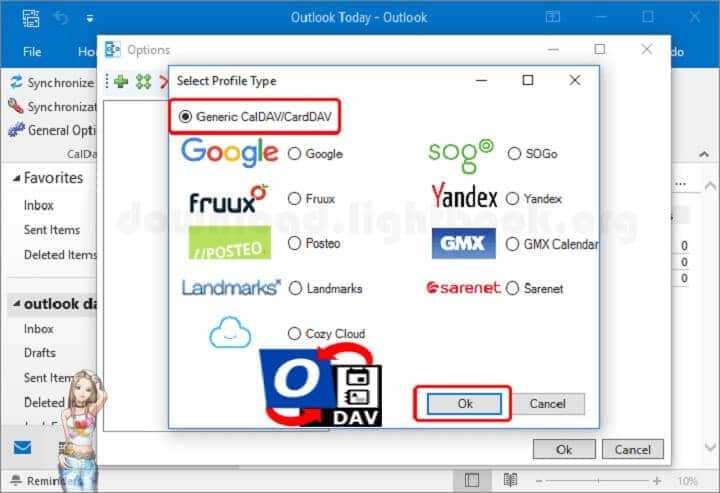
To install the program, download the latest version from the official website or GitHub repository. After running the installer, the tool integrates automatically into Outlook, adding a dedicated tab for managing synchronization. Next, users must enter server details, including the CalDAV or CardDAV URL, username, and password, and select the folders to synchronize.
Advanced settings allow for features like periodic synchronization every few minutes, handling SSL certificates, and syncing categories and colors. These steps ensure that your data remains up-to-date, and Outlook CalDav Synchronizer operates efficiently without constant user intervention.
Key Features of Outlook CalDav Synchronizer
The tool boasts a wide range of features, making it a top choice for syncing data between Outlook and CalDAV/CardDAV servers:
Multi-Protocol Support: Compatible with CalDAV and CardDAV, ensuring integration with major cloud services.
Two-Way Synchronization: Changes in Outlook or the server automatically reflect on the other side.
Flexible Customization: Users can select folders, data types, and update intervals according to their needs.
Multiple Account Syncing: Manage several accounts easily from the same interface.
Recurring Events and Exceptions: Handle repeated appointments and changes without losing details.
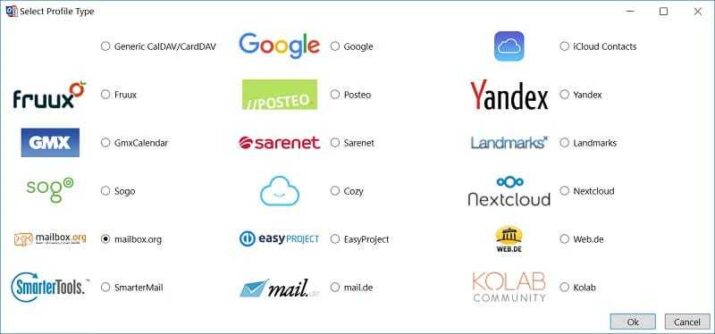
Compatibility with Various Cloud Services: Works with Google Calendar, iCloud, Nextcloud, and more.
Sync Logs and Reports: Review synchronization logs to confirm successful updates.
Task and Contact Management: Sync tasks with Google Tasks and CardDAV contacts while organizing categories.
Category Colors and Visual Organization: Manage appointments visually with color coding.
User-Friendly Interface: Integrated seamlessly into Outlook with a dedicated settings tab.
Customer Support and Help Center
Although free and open-source, Outlook CalDav Synchronizer enjoys active community support. The official website provides detailed step-by-step guides, video tutorials, and documentation to help new users configure and troubleshoot the add-in.
Additionally, the GitHub forum allows users to ask questions, discuss issues, and receive practical solutions from other experienced members. This community-driven support ensures that both beginners and advanced users can resolve problems efficiently and enhance their user experience.
Pricing and Plans
The main advantage is that it is completely free, making it ideal for individuals and small businesses seeking an effective solution without costs. There are no subscription fees or limits on the number of accounts or data volume. Users can optionally contribute to the project through donations to support ongoing development and the addition of new features, ensuring continuous performance improvement and stability.
Pros and Cons
Pros
- Free and open-source software.
- Full support for CalDAV and CardDAV protocols.
- Two-way synchronization ensures data consistency.
- Flexible customization for folders, categories, and update intervals.
- Active community support for troubleshooting and guidance.
Cons
- Requires Outlook installation.
- Initial setup can be challenging for beginners.
- Relies on a stable internet connection for real-time syncing.
User Experiences and Testimonials
User experiences indicate that Outlook CalDav Synchronizer delivers stable performance when syncing large amounts of data. Users appreciate the flexibility in customizing categories and colors, and its accurate handling of recurring events and exceptions. While some beginners find the initial setup challenging, following official tutorials and engaging with the community makes the process smooth, suitable for both personal and professional use.
Comparison with Other Tools
Compared to alternatives like gSyncit and Sync2, it stands out due to its free, open-source nature while offering similar advanced features. Paid tools may provide a more modern interface and direct support, but this tool gives users extensive control and customization without any cost, making it the best choice for those who want high performance without paying for subscriptions.
Tips for Effective Use
- Set sync intervals according to data size to reduce resource consumption.
- Keep a backup of your Outlook data before initial sync.
- Use manual sync when needed to conserve internet usage.
- Monitor updates regularly for optimal performance.
- Filter unnecessary folders to speed up synchronization.
- Check sync logs regularly to identify any errors or failures.
Frequently Asked Questions (FAQs)
Q: Can it sync with Outlook.com?
Yes, as long as Outlook.com supports CalDAV or CardDAV protocols.
Q: Can it be used on macOS?
No, the tool is designed for Windows only.
Q: Is there a limit on the number of accounts?
No, users can add unlimited accounts as needed.
Q: Does it sync tasks and contacts?
Yes, it supports Google Tasks, CardDAV contacts, and categorization.
Importance of System Maintenance
Maintaining Outlook and Outlook CalDav Synchronizer properly is crucial for uninterrupted performance. Regular updates, clearing duplicate or unnecessary data, and verifying internet connections ensure smooth synchronization. Proper maintenance reduces errors, ensures accurate syncing, and maximizes the efficiency of both Outlook and the plugin.
Tutorials and Additional Resources
The official website and GitHub community provide textual and video tutorials, along with detailed user manuals. These resources help users understand all functions, manage issues effectively, and optimize the tool for personal or professional use.
System Requirements
- Windows 7 or higher.
- Microsoft Outlook 2010 or newer is installed.
- Stable internet connection for real-time synchronization.
Getting Started
After installation, open Outlook and add the accounts you want to sync by entering the server credentials. Choose the folders and data to synchronize, then start a manual sync or schedule automatic syncing. Testing on a single calendar before full synchronization helps prevent errors and ensure data accuracy.
Common Issues and Troubleshooting
Frequent issues include failed server connections, duplicated data, or incomplete synchronization. Solutions typically involve verifying account settings, performing manual sync, or reviewing logs for errors. Testing with a small folder first can prevent major issues during full synchronization.
Best Practices for Optimal Performance
- Keep Outlook CalDav Synchronizer updated.
- Use scheduled syncs to reduce system load.
- Disable unused accounts to improve efficiency.
- Check synchronization logs after each operation.
- Apply filters to sync only relevant data.
Future Updates and Roadmap
Developers are continuously working on faster synchronization, wider service support, and a more user-friendly interface for beginners. Improvements also focus on stability with large datasets and compatibility with the latest versions of Outlook.
Community and User Forums
The tool benefits from an active GitHub community where users exchange tips, ask questions, and share solutions. This peer support enhances user experience, encourages continuous improvement, and ensures it remains a reliable, evolving tool.
Conclusion
In conclusion, Outlook CalDav Synchronizer is one of the most effective tools for synchronizing Outlook servers. Combining high performance, setup flexibility, and zero cost, it is suitable for individuals and small businesses alike.
It provides a secure, reliable platform for managing appointments, tasks, and contacts, with category and color support to simplify time management. Using this tool guarantees seamless synchronization across all devices and cloud services, saving users valuable time and effort while maintaining data accuracy.
Technical Details
- Category: Communication
Software name: Outlook CalDav Synchronizer
- Version: Latest
- License: Full Free – Open Source
- File size: 4.5 MB
- Operating Systems: All Windows XP 7/8/10/11 systems and other systems
- Core: 32/64-bit
- Languages: Supports many languages
- Developer: Generalize-IT Solutions OG
- Official site: caldavsynchronizer.org